
Outbox Worker (CLI & TUI)
This worker is responsible for delivering publishable events from the transactional outbox to your message bus with retries, leasing, and cooperative partition processing.
The worker delivers publishable events from the Transactional Outbox to your bus with retries.
Command
php artisan pillar:outbox:work [--no-leasing] [--once] [--json] [--silent] [--interval-ms=0] [--window=0]Options
--no-leasing– Disable partition leasing (single‑worker mode). Best for local dev.--once– Run a single tick and exit (useful in tests / cron‑style runs).--json– Emit one JSON line per tick (structured logs).--silent– Run without printing anything.--interval-ms– Extra sleep between ticks; default 0ms.--window– Aggregate stats over N seconds in interactive mode (shows running totals & next refresh timer).
Interactive UI
When run in a TTY, the command renders a compact UI showing:
- Summary: avg tick duration (or last), last heartbeat age, active workers, next refresh timer, tick count in window.
- Throughput: claimed / published / failed in the current tick or window, purge count, last backoff.
- Partitions: desired (target), owned, lease attempts, released in the last tick.
- Recent errors: a small rolling buffer of the latest failures (time, sequence, message).
For a full overview of outbox concepts, see /concepts/outbox-worker.
The UI adapts to terminal width: three columns (wide), two columns (medium), or stacked sections (narrow).
php artisan pillar:outbox:work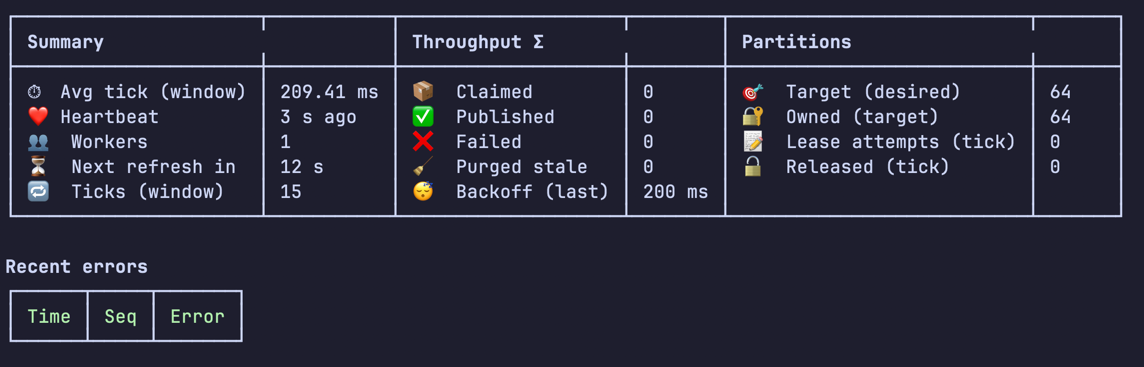
Behavior highlights
- Leasing: with
leasing = true, the runner divides partitions among active workers (stable modulo). It leases, renews, and releases partitions and heartbeats to remain active. - Fair work split: the tick splits
batch_sizefairly across owned partitions. - Backoff: when a tick processes nothing, the runner sleeps
idle_backoff_msbefore continuing (cooperative backoff). - Purge stale: stale worker rows are purged opportunistically (rate‑limited via cache).
Where this fits in Pillar
The outbox worker is part of Pillar’s delivery pipeline: aggregate roots emit events → they land in the transactional outbox → the worker claims and publishes them → projectors and external systems receive them.
See: /concepts/events and /concepts/projectors.
Lease & claim internals (DB‑native, cooperative)
Pillar’s worker coordination is implemented entirely in the database—no separate coordinator service:
- Cooperative leasing: Each partition (e.g.,
p00..p63) has a lease row inoutbox_partitions. Workers acquire/renew leases by updatinglease_ownerandlease_untilusing the DB clock. If a worker dies, leases naturally expire. - Dynamic discovery: Active workers are tracked in
outbox_workerswith aheartbeat_untiltimestamp. The runner computes its target partitions via a stable modulo over the sorted list of active worker ids, so load rebalances automatically as workers join/leave. - Per‑partition ordering: With leasing enabled, at most one worker processes a given partition at a time, preserving order within that partition.
Database‑specific optimizations
To claim outbox rows, the worker uses the most efficient path for your driver:
- PostgreSQL & SQLite: Single‑statement
UPDATE … RETURNINGperforms the selection and claim atomically and returns the claimed rows in one round‑trip. - MySQL: A fast two‑step approach: a SELECT determines candidate ids; then an
UPDATE … JOINstamps aclaim_tokenand bumpsavailable_at. The batch is fetched by that token. Despite two statements, this is still **very performant ** with proper indexes.
The outbox worker uses the same partitioning strategy as the event store (via
StreamPartitioner), but outbox partition keys are independent of stream IDs. This ensures even distribution regardless of aggregate hotspots.
All paths use DB‑derived timestamps to avoid app clock drift between worker nodes.
Claim vs. lease
- Leases (in
outbox_partitions) control which partitions a worker is allowed to pull from. - Claims (in
outbox) are short, per‑row holds (viaclaim_token/available_atbump) that prevent duplicate delivery while a batch is being processed.
In-process ticks (Pillar::tickOutbox())
In addition to the CLI worker, you can run one outbox tick in-process via the Pillar facade:
use Pillar\Facade\Pillar;

$result = Pillar::tickOutbox();This executes the same work cycle as the CLI worker:
- joins/heartbeats the worker registry (first call)
- acquires/renews leases (if enabled)
- claims a batch from the outbox
- dispatches stored events to listeners/projectors
- marks messages as published/failed
It returns a TickResult (claimed/published/failed counts, timing, partition info), which is handy for quick scripts and assertions.
When to use
- Tests: commit an aggregate session, then immediately process projections
- Local dev / demos: run the “commit + project” loop without starting a separate worker
- One-off scripts: a simple synchronous processing path
Important notes
tickOutbox()may sleep foridle_backoff_mswhen no work is found.- Prefer the dedicated CLI worker in production for predictable request latency.
- If you call
tickOutbox()after persisting events inside a DB transaction, do it after commit (e.g.DB::afterCommit()), otherwise the worker may not see the new outbox rows yet.
Example (dev/test):
$session->commit();

Pillar::tickOutbox(); // delivers outbox events to projectors/listenersConfiguration reference
See the full list of options (partitioning, worker timings, table names, partitioner strategy) in the configuration docs: /reference/configuration#outbox.
Worker lifecycle
A worker tick performs:
- Heartbeat renewal
- Lease acquisition/renewal (if enabled)
- Claiming batches
- Publishing events
- Backoff if idle
- Optional purge of stale workers
Output modes
- Human UI (default, TTY)
- One‑line summary (non‑interactive, no
--json) - JSON per tick (
--json), containing counts, durations, and partition info
Example JSON line:
{
  "claimed": 10,
  "published": 10,
  "failed": 0,
  "duration_ms": 3.12,
  "backoff_ms": 0,
  "renewed_heartbeat": true,
  "purged_stale": 0,
  "active_workers": 1,
  "desired_count": 64,
  "owned_count": 64,
  "leased_count": 0,
  "released_count": 0,
  "ts": "2025-11-12T00:00:00Z"
}⚠️ Changing partition_count
If you change pillar.outbox.partition_count, you must sync the lease keyspace so the outbox_partitions table matches your new configuration:
php artisan pillar:outbox:partitions:sync --pruneWhy this matters
- The set of partition labels (e.g.,
p00..p63) is derived frompartition_count. Workers only lease partitions that exist inoutbox_partitions. - Changing
partition_countchanges the hash-to-partition mapping for future events. Existing outbox rows keep their originalpartition_key.
Ramifications & safe procedure
- Increasing the count: safe. Run the sync command (with
--prune) to create the new partitions. Workers will rebalance automatically. - Decreasing the count: take care to avoid stranded rows in “old” partitions.
- With leasing enabled, workers won’t target partitions that no longer exist in
outbox_partitions. - Recommended procedure:
- Run
pillar:outbox:partitions:syncwithout--prunefirst. This creates the new keyspace but keeps the old partitions. - Let workers drain any remaining messages in the old partitions (watch the UI).
- When old partitions are empty, run
pillar:outbox:partitions:sync --pruneto remove them.
- Run
- Alternative: temporarily run the worker with
--no-leasing(or setworker.leasing=false) to process all rows regardless of partition leases, then switch back and prune.
- With leasing enabled, workers won’t target partitions that no longer exist in
Notes
- The UI’s partitions view reflects
outbox_partitions; re‑run the sync command after a config change so the UI matches. - Event streams are unaffected; only outbox leasing/claiming is impacted.
Operational tips
- Keep handler side‑effects idempotent (outbox is at‑least‑once).
- For single instance deployments, you can disable leasing and just run one worker.
- If you scale horizontally, set
partition_countto a power of two and let workers auto‑balance via leasing. - Use
--windowto get more meaningful throughput numbers in the interactive UI.
Related docs
- Transactional Outbox → Outbox
- Worker leasing model → /concepts/outbox-worker